Lense: Disposable Event Camera
- 4.8
- Rating
- 50.00K
- Installs
- Free
- Price

 Analysis by App-foxy
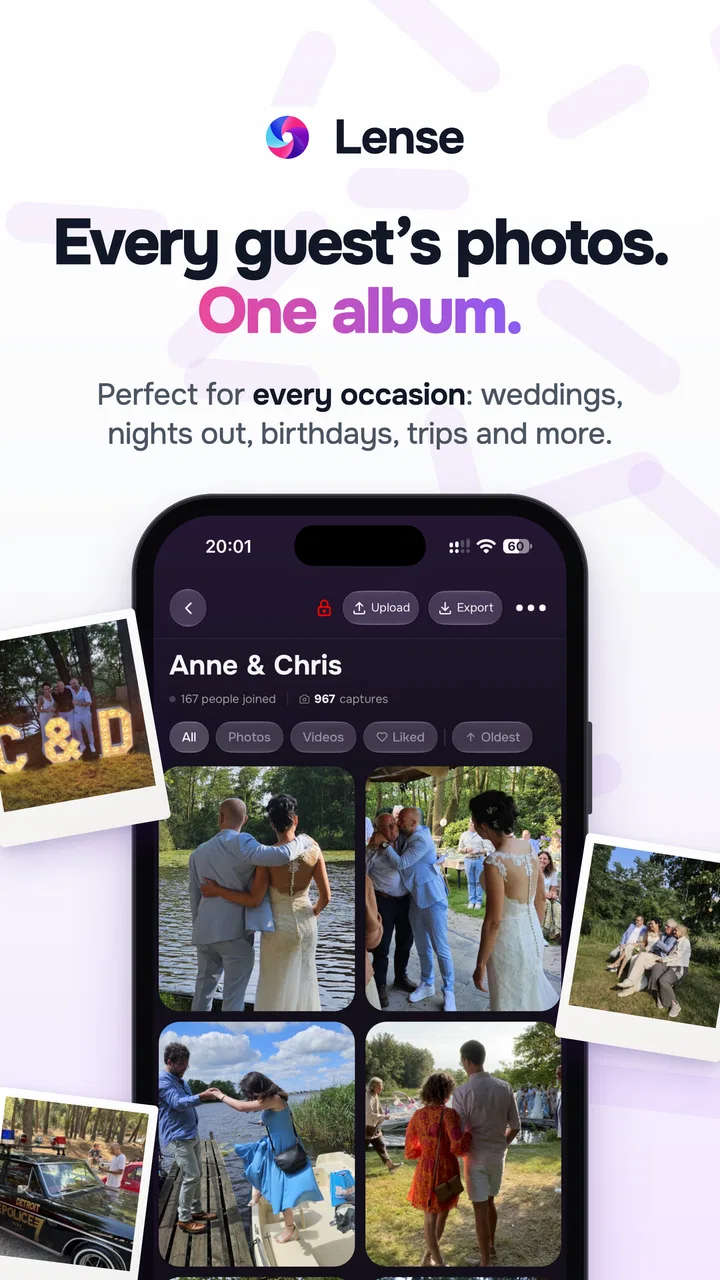
I found Lense: Disposable Event Camera most interesting when I stopped treating it like a normal camera and used it as a shared memory-making tool. It is an events app from Rewaive B.V. that gives a gathering a disposable-camera feel through a phone. The idea is simple: people take pictures during an event, and the value comes from the collection as much as from any single image.
That distinction matters. If you want complete control over exposure, lenses, editing, and instant results, your regular camera app is still the better choice. Lense is aimed at a different kind of moment: a wedding, birthday, trip, party, school event, or family get-together where several people should contribute without needing photography skills. In my experience, its appeal is less about making technically perfect photos and more about encouraging spontaneous ones.
The app is free to install and suitable for Everyone, although optional in-app purchases range from $5.49 to $109.99 per item. It has an average rating of 4.8 from around 1K ratings, with over 50K installs, so it has clearly found an audience beyond a small experiment. It was released on February 25, 2023, and version 1.4.5 supports Android 7.0 and later.
You May Also Like

 Blood Strike: 2.5 Anniversary
Blood Strike’s Loadouts Turn Every Drop Into a Tactical Gamble
A close look at Blood Strike’s custom loadouts: how fast access to signature weapons reshapes its battle royale rhythm, rewards preparation, and narrows the gap between fights.

 Pandora - Music & Podcasts
Pandora’s Music Is Easy to Start, but Harder to Recover
Pandora’s strength is its low-effort path from a seed to a station. Its weak spot is how much confidence it asks you to place in connection, setup, and quiet recovery.

 8 Ball Pool
 Is Built on Rivalries, Rematches, and Routine
A close look at the rivalries, rematches, shared routines, and unanswered safety questions that turn a quick pool match into a persistent mobile community.

 Samsung Music
’s Quiet Strength Is Playing What You Already Own
Its reach comes less from spectacle than from dependable access to a personal library. That simplicity is both the app’s strongest retention engine and its ceiling.

 AccuWeather: Weather Radar
AccuWeather Review: A Quick, Clear Forecast for Everyday Decisions
For everyday plans, the best forecast is the one you can understand quickly. AccuWeather makes rain timing, radar, and local conditions easy to act on, with a few trade-offs.

 Hill Climb Racing
Why Hill Climb Racing Still Turns Crashes Into One More Run
A tiny car, a bumpy hill and one more upgrade: Hill Climb Racing keeps resurfacing because its simple chaos makes every near-miss feel personal.
More From Our News Desk



How I would use Lense from the first event onward
I’d begin with a small, low-pressure gathering and treat the first run as a chance to learn how your group responds, rather than expecting a perfect album immediately. I’d note which instructions guests actually need and keep the next event’s invitation brief, so joining feels easy instead of like another task. Once that routine feels natural, it becomes much easier to decide whether Lense suits a larger occasion.
Start with the event, not the individual photo
The most useful way to approach Lense is to decide what the shared camera is supposed to capture before anyone starts tapping the shutter. For a birthday, I would want a mixture of the arrival, decorations, small conversations, and the moment everyone gathers. For a wedding, the obvious ceremony images matter, but the informal photographs of guests between formal moments may become the most personal part of the collection.
This gives participants a quiet prompt without turning the event into a photography assignment. I would tell guests to use it for moments they would normally overlook: a friend laughing at the edge of the room, the person arranging the cake, or a quick group photo before people move on. That approach makes the camera feel communal rather than competitive.
The baseline workflow is straightforward. Set up the event, invite the people who should participate, and let them take pictures through the app. The important preparation is not technical; it is social. Guests need to understand that they are contributing to one shared record, not merely saving pictures privately on their own phones.
A realistic evening with the app
Imagine a small birthday dinner in a restaurant. I would create the event before guests arrive, make sure the host knows how participants will join, and take one or two test photos while the room is still relatively calm. Then I would put the phone away and let the group use the camera naturally. During dinner, I would avoid repeatedly checking the collection because that can make people perform for the camera.
Later, the shared set should reflect the evening from several viewpoints. One person may focus on food, another on conversations, and someone else on the decorations. That variety is the reason to choose Lense over asking everyone to send their best photos in a messaging group. A chat thread is good for immediate sharing, but it often buries images among unrelated messages and encourages people to select only polished shots.
For a larger event, I would appoint one person to explain the process and answer basic questions. That small bit of organization prevents the host from becoming technical support while also greeting guests. It is one of the less obvious lessons with this kind of app: the smoother the introduction, the more spontaneous the pictures become afterward.
What makes the disposable-camera idea work
The disposable-camera concept creates a useful limitation in spirit, even when people are using modern phones. It nudges participants away from endless retakes and heavy editing. A slightly imperfect image can carry more atmosphere than a carefully posed portrait, especially when the purpose is to remember how the event felt.
I would not use Lense to replace a professional photographer at an important ceremony. A professional has the experience, equipment, timing, and responsibility needed for essential images. Instead, I see Lense as the informal layer around the main coverage: the guest perspective, the behind-the-scenes details, and the pictures that happen because nobody is directing them.
Settings and preparation worth checking
Before inviting a crowd, I would check the app’s available event and camera options on the actual phone that will be used. I would also confirm that the device is running a supported Android version and that there is enough storage for ordinary phone use. I am deliberately cautious here because event apps can behave differently depending on the host device, participant device, network conditions, and how many people are trying to join at once.
A short rehearsal is more valuable than a long explanation. Create a small test event, invite one other person, take a picture from both sides, and make sure each participant understands the basic flow. This catches practical confusion before the party begins. It also tells you whether the host should keep the phone available or whether guests can comfortably use their own devices.
If you are considering an optional purchase, I would wait until the basic event workflow makes sense. The free starting point lets you judge whether your group actually enjoys the shared-camera format. Spending before testing the social habit is less sensible than trying a small gathering first, particularly because the available purchase items vary from $5.49 to $109.99.
Small habits that improve the results
Experienced use is mostly about timing. I would take a few photographs early, before people become self-conscious, then leave the app alone during the busiest part of the event. When everyone is already posing, the collection can become repetitive. The strongest set usually needs a balance between planned group shots and quick images made in passing.
I would also avoid handing the phone to the same confident photographer all night. Rotate participation deliberately. A shy guest may notice details that the host misses, while a child or older relative may contribute a completely different view of the gathering. The app works best when the camera belongs to the event rather than to its organizer.
Another useful habit is to define a simple visual rule. For example, ask people to capture one image of a person, one detail, and one unexpected moment. This is not a feature claim about Lense; it is a repeatable way to prevent the collection from filling with identical group photos. It also gives guests an easy prompt without requiring them to learn photography.
Faster patterns for busy events
At a large party, the biggest friction is usually not taking a picture but explaining what to do. I would place the invitation instructions where guests naturally look, then demonstrate the process once to a small group. After that, ask those early participants to help others. A shared camera spreads more smoothly through a crowd when several people understand it instead of one host repeating the same steps.
For a short event, I would create a compact capture window: encourage contributions during arrivals, the central activity, and the final group moment. This produces a beginning, middle, and end rather than a random pile of images. For a full-day occasion, I would use the same idea in stages, taking care not to make every part feel like a scheduled photo session.
When people are moving quickly, I would favor simple compositions and good timing over elaborate framing. Lense’s strength is participation, so any workflow that makes guests hesitate for too long works against the app’s character. The best shortcut is often a clear instruction such as “take the moment as it happens,” followed by leaving people free to interpret that in their own way.
Where Lense compares well with ordinary alternatives
The usual alternative is the phone’s built-in camera. That option wins for speed, image control, editing, and immediate access to every file. It is also the safer choice when you need a specific photograph, such as a formal portrait or a detailed low-light shot. If your priority is technical quality, use the standard camera or a dedicated photography app.
Another alternative is a group chat or shared album. Those tools are familiar and often convenient, but they can turn the event into a stream of messages, reactions, screenshots, and unrelated conversation. Lense has a clearer purpose: it frames the photographs as a collective event record. That focus can encourage contributions from people who would not normally upload anything to a shared album.
Physical disposable cameras offer a different kind of charm. They create a tangible object and a slower, more deliberate process, but they also require film handling and later development. Lense is easier to include in a modern gathering because participants already carry phones. The trade-off is that it cannot reproduce every physical detail of film photography, and the experience depends on people engaging with an app rather than passing around one camera.
Limits that matter before you choose it
Lense is not the right choice if your event needs guaranteed coverage. Guests can forget to participate, take too many similar images, or concentrate on their own conversations. A shared camera reflects the habits of the group, so the final collection may be uneven. I would pair it with a planned photographer whenever important moments cannot be missed.
It is also less suitable for someone who wants a private, carefully edited personal gallery. The whole point is shared participation, and that can feel intrusive or distracting if your preference is to control every image. Likewise, a very small event with only one or two people may not gain much from the communal format; the ordinary camera app may be faster.
Connectivity and device comfort are practical considerations too. I would not introduce the app for the first time during a tightly scheduled ceremony or while guests are rushing between locations. Test it beforehand, keep the joining instructions simple, and allow a backup plan. That is not a criticism unique to Lense; it is the normal cost of adding a digital layer to a live event.
Who will get the most from it
I think Lense is especially appealing to hosts who want candid memories without assigning one person to document everything. It suits celebrations where the guests already know one another and are likely to enjoy contributing. It can also work well for trips, reunions, informal workplace gatherings, and school occasions where different viewpoints are part of the story.
I would recommend it less strongly to professional photographers, privacy-conscious groups that do not want shared participation, or anyone seeking advanced camera controls. The app’s value is in the event workflow, not in replacing a full photography toolkit. Understanding that distinction prevents disappointment.
My verdict after looking at the complete workflow
What I like most about Lense is that it gives a gathering a reason to take pictures together. The app is more purposeful than simply telling everyone to send photos later, and it is more convenient than organizing physical disposable cameras. Its best results come from a host who prepares lightly, explains the idea clearly, and then resists controlling every frame.
The app does require a little social planning. You need to introduce it, test the process, and accept that the final collection will contain imperfect images. For me, that is not a flaw to eliminate; it is the trade-off that makes the result feel like a shared memory rather than a formal album.
With its free entry point, Everyone age rating, and support for Android 7.0 and later, it is easy to consider for a casual event. The developer, Rewaive B.V., has positioned it as an events app rather than a general-purpose camera, and that focus comes through in how I would use it. I would choose it when participation matters more than precision, and I would keep a regular camera available when an important image must be captured reliably.
My final recommendation is simple: use Lense as the informal, collective camera around an event, not as the only camera responsible for it. If you prepare the invitation, rotate participation, and give guests a few creative prompts, the app can produce a warmer and more varied record than a carefully managed gallery. If you want full control, instant professional results, or a completely private workflow, choose a conventional camera or shared album instead.
FAQs for Lense: Disposable Event Camera
01What is Lense: Disposable Event Camera and how does it work?
Lense: Disposable Event Camera is a unique app designed to mimic the charm of a disposable camera. Users can capture photos with a vintage feel, which only become available for viewing after 24 hours. This delay adds an element of surprise and nostalgia, reminiscent of old-school photo development.
02Does Lense require an internet connection to function?
While Lense can capture photos without an internet connection, it requires connectivity to process and store images in the cloud. This ensures your photos are safely backed up and accessible once the 24-hour development period is complete.
03Are there any in-app purchases or subscription plans in Lense?
Lense offers a basic free version with limited features. However, for users seeking enhanced functionalities, such as additional filters, higher storage limits, or faster photo processing, there are in-app purchases and subscription plans available. These upgrades provide a richer user experience.
04Can I share my photos directly from the Lense app?
Yes, once your photos are developed, you can share them directly from the Lense app to various social media platforms or send them via messaging apps. The app also allows you to download the images to your device for offline sharing or printing.
05Is Lense suitable for professional photography?
Lense is primarily designed for casual photographers and enthusiasts who enjoy the aesthetic of disposable cameras. While it offers unique filters and effects, it may not meet the technical needs of professional photographers looking for precision and control in their work.
Pros
- Simple and intuitive interface.
- No registration required to use.
- Photos are shared instantly.
- Unique disposable camera experience.
- Lightweight and fast to install.
Cons
- Limited editing features.
- Photos can't be saved locally.
- Must be online to use.
- Ads can be intrusive at times.
- Limited to event-based usage.

Lense: Disposable Event Camera
Gallery